The Dialog System Core
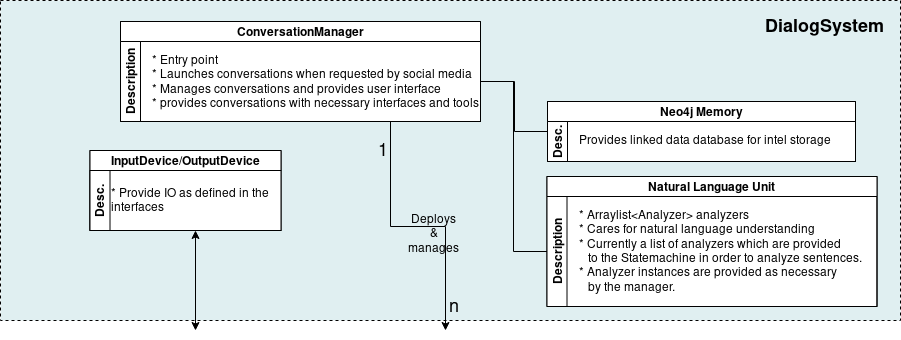
The Dialog System Core takes care of spawning, deleting and managing Conversations, initializing and providing all necessary static core features and services like the memory, the NLU, Statemachine, etc. to Conversations. Its heart is the ConversationManager, which is accompanied by the external services of Memory and NLU and the InputDevices and OutputDevices which provide interfaces to communication channels which we call World Interfaces, since the Roboy Dialog System may interface the world through these.
| alt: | Dialog System Core architecture |
|---|
ConversationManager
The roboy.dialog.ConversationManager is the central managing node for the Dialog System. It is the entry point of the program. When roboy.dialog.ConversationManager.main() is launched, it initializes all necessary modules and then enters control-mode, where it assumes a behaviour depending on the selected InputDevice in order to provide control over the Conversations.
Initializing includes initializing the ROS node, initializing roboy.linguistics.sentenceanalysis.Analyzer classes from the NLU and placing them in a List so they may be invoked by the Conversations in a correct order.
In order to manage *Conversations* it stores them by UUID, which is in the format “[world-interface-name]-[uuid-from-world-interface”, for example “telegram-aaaaaaaaaaaa”. Then it provides an API consisting of methods that allow controlling the Conversation threads if you know their uuid. It allows creating and spawning new Conversations and restarting, stopping and pausing existing ones. Also it allows deregistering Conversations so they can properly be destroyed when they are over.
InputDevice & OutputDevice
The roboy.dialog.io.InputDevice and roboy.dialog.OutputDevice classes are interfaces that may be used to provide World Interfaces to the Roboy Dialog System. Their actual behaviour depends on the architecture of the system that should be interfaced.
In order for input to be handled by the *Conversations*, an implemnetation of roboy.dialog.io.InputDevice must provide a public Input listen() method. A Conversation Thread will call this function in order to recieve a new roboy.dialog.io.Input. If no new input has been generated by the user, the thread should wait inside the listen() function until a new input is generated.
To enable a Conversation to send output to a channel, an implementation of roboy.dialog.io.OutputDevice must provide a public void act(List<Action> actions) which should process the different types of roboy.dialog.action.Action according to the capabilites of the communication channel.
If an InputDevice or OutputDevice needs static or external action when it gets destroyed it should implement roboy.dialog.io.CleanUp. An example for this is roboy.dialog.io.TelegramInput.
NLU (Semantic Parser)
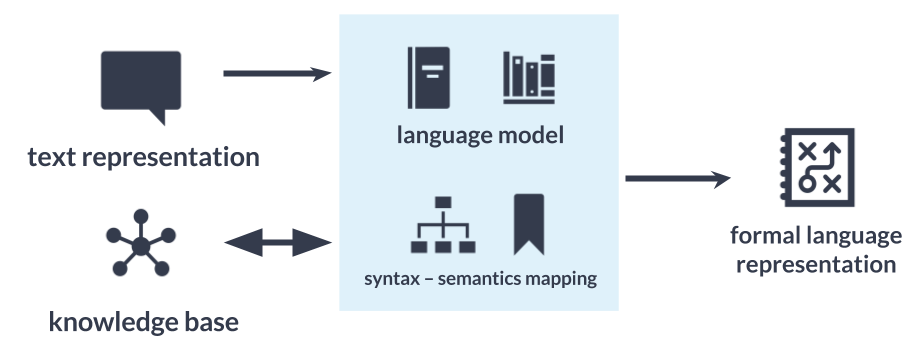
Semantic parser is used to translate text representation into formal language representation. The aim is to be able to process user utterances and react upon them.
roboy_parser is based on SEMPRE <http://nlp.stanford.edu/software/sempre/>. It is currently being modified to fulfill Roboy Dialog system needs.
Installation
In order to use semantic parser, you need to:
clone
roboy_parserrepository:git clone http://github.com/Roboy/roboy_parser
navigate to created repository:
cd roboy_parser
download dependencies:
./pull-dependencies roboy
build it:
mvn clean
mvn install
run it:
mvn exec:java -Dexec.mainClass=edu.stanford.nlp.sempre.Main
Architecture
Semantic parser is based on the language model and NLP algorithms that then apply rules to the utterance to translate it. Language model consists of: - set of grammar rules, - lexicon, - training dataset.
General architecture can be seen on the diagram below.
| alt: | Semantic parser general architecture |
|---|
Implementation
roboy_parser is a separate Java project and is communicating using WebSocket. Dialog system has a client implemented in SemanticParserAnalyzer.java class. It is therefore part of Natural Language Understanding unit.
Current parser was modified from SEMPRE and currently has following components

| alt: | Semantic parser components |
|---|
Functionalities
Roboy parser currently has currently following functionalities:
| header: | “Functionality”, “Software used”, “Summary” :widths: 20, 20, 60
“Parser result”, “Parser”, “Logical representation of an utterance” “Parser answer”, “Parser”, “Answer for resulting parser result” “Follow-up”, “Parser”, “Follow-up questions for underspecified term” |
|---|
Usage
In order to run the parser, you need to run roboy_parser first - see instructions on project Github <http://github.com/Roboy/roboy_parser> and then run Dialog System.
Configurations
To test parser, you can run following execution configurations using maven. For more information refer to project documentation <http://github.com/Roboy/roboy_parser>
| header: | “Command”, “Options” :widths: 20, 40
|
|---|
Memory (The memory module)
General design
To remember information about itself and its conversation partners, their hobbies, occupations and origin, a persistent Memory module has been implemented using the Neo4j graph database.
Implementation
Roboy’s Dialog System interactions with the Memory module (learn more) are based on ROS messages.
The messages are sent using the methods in de.roboy.ros.RosMainNode, which implements the four query types based on the specified Memory services:
| Method name | Description |
|---|---|
| CreateMemoryQuery | Creates a node in Memory database |
| UpdateMemoryQuery | Adds or changes information of an existing node |
| GetMemoryQuery | Retrieves either one node or an array of IDs |
| DeleteMemoryQuery | Removes information from or deletes a node |
| CypherMemoryQuery | For more complex queries (future) |
The messages received from Memory are in JSON format. To enable flexible high-level handling of Memory information, two classes were created to incorporate the node structures and logic inside the Dialog System. The de.roboy.memory.nodes.MemoryNodeModel contains the labels, properties and relationships in a format which can be directly parsed from and into JSON. For this, Dialog is using the GSON parsing methods which enable direct translation of a JSON String into its respective Java class representation.
Methods such as getRelation() or setProperties() were implemented to allow intuitive handling of the MemoryNodeModel instances. A separate class, de.roboy.memory.nodes.Interlocutor, encapsulates a MemoryNodeModel and is intended to further ease saving information about the current conversation partner of Roboy. Interlocutor goes one step further by also abstracting the actual calls to memory, such that adding the name of the conversant performs an automatic lookup in the memory with subsequent updating of the person-related information. This is then available in all subsequent interactions, such that Roboy can refrain from asking questions twice, or refer to information he rememberes from earlier conversations.