World Interfaces
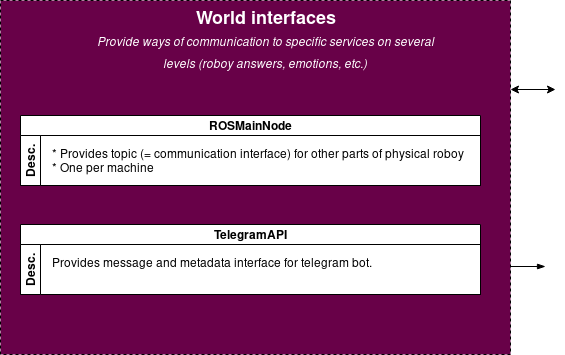
A world interace is any external service, device, etc. that enables the Dialog System to interact with the world outside of the dialog system. Interaction with a World Interface is provided to a conversation via InputDevices and OutputDevices. Some need to be initialized or controlled which would be done by the ConversationManager. This page is a list of currently supported World Interfaces and provides information on how to use them and how they work.
| alt: | Dialog System World Interfaces |
|---|
ROS
Note
Robot interface
The Robot Operating System (ROS) provides an interface so the dialog manager may be deployed as the brain of roboy. It provides a way to communicate with the actual hardware and using its many ways of acting on and sensing the world as in- and outputs.
The memory, vision, emotion, speech, generative model and middleware communication is carried out through RosMainNode object which implements AbstractNodeMain (inheriting NodeListener of rosjava) and offering the control through the following important methods:
- onStart
- onShutdown
- onShutdownComplete
- onError
Currently, it also provides with the next custom methods:
- SynthesizeSpeech
- RecognizeSpeech
- GenerateAnswer
- ShowEmotion
- CreateMemoryQuery
- UpdateMemoryQuery
- GetMemoryQuery
- DeleteMemoryQuery
- CypherMemoryQuery
- DetectIntent
- addListener
- waitForLatchUnlock
Cerevoice
Note
I/O Device
Chose cerevoice in- and output in config.properties.
Cerevoice is a software for speech-to-text and text-to-speech processing. An external cerevoice software instance must be provided in order for the Dialog System to use this.
UDP
Note
I/O Device
Chose udp in- and output in config.properties.
The dialog system may recieve and send in- and output that needs no further processing through a udp port configured in config.properties.
Bing
Note
Input Device
Chose bing input in config.properties.
Bing speech-to-text processing. Requires internet connection and the roboy_speech_recognition ROS package.
Command line
Note
I/O Device
Chose cmd in- and output in config.properties.
In- and output via the command line in which the Dialog System is launched. Pure text-based in- and output.
Telegram
Note
I/O Device
Chose telegram in- and output in config.properties.
Use a telegram bot to interface with the world. In order to use this, register a bot Register a bot as described on the `telegram website`_. And place your telegram-bot authentification token in a JSON-File structured like this: .. _telegram website: https://core.telegram.org/bots#3-how-do-i-create-a-bot
- {
- “TOKEN”:”AAAAAAAAA:AAAAAAAAAAAAAAAAAAAAAAAAAAAAAAAAAAA”, “BOT_USERNAME”:”Botname”
}
Provide the path to this file to the Dialog System via TELEGRAM_API_TOKENS_FILE: "/path/to/example.json" in config.properties.